What your CMD command line security is missing

Here is what your should do to increase your cmd command line security
Gap in Your Command-line Security

I want to write a follow-up on my last post about chain-of-commands not properly being captured by many defensive tools. During further research and testing, I observed that built-in Windows Command line actions are also not captured.

For instance, a simple act of deleting a file from the CMD Command-line is neither captured in SYSMON or in Windows Event logs:

 CMD.EXE > del /f test_file.txt
file_del_cmd

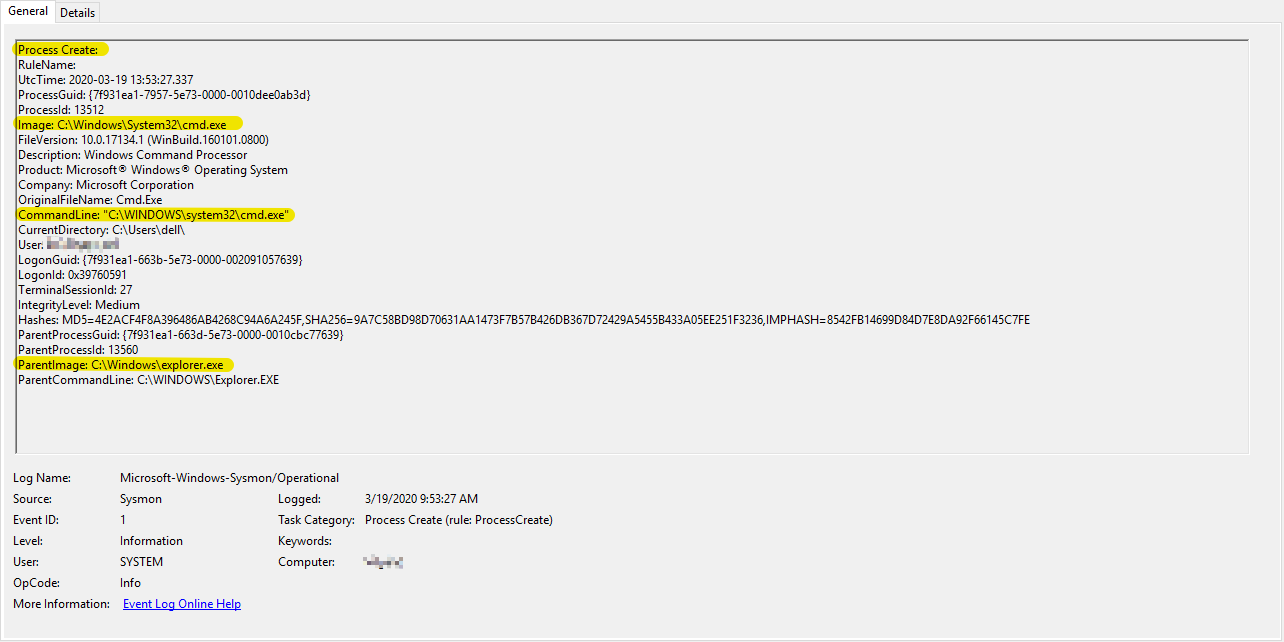
The only event observed in SYSMON for the above action was the following:

del_file

Additionally, nothing notable was observed in Windows Event logs.

This simple act of deleting a file is a common technique used by the adversaries. This action could be done both manually or through malware. One example where this technique is used is in the case of the Robbinhood Ransomware. In this sandbox report, you can see various quite-delete operations that Robbinhood malware executes.

I understand that there are other means of extracting CMD Command-line execution content. However, many of those require digital forensics analysis.

For instance, you can review Command-line history by analyzing the memory capture using a tool such as Volatility with plugins: cmdscan, consoles or just running strings against the memory image. However, this type of analysis requires either a memory image capture or a specialized commercial solution that can scan live memory content (example). Unfortunately, most organizations do not have access to these enterprise-solutions thus their ability to hunt for such Command-line techniques becomes limited.

MITRE ATT&CK Evaluations also has an entry for this technique 9.C.4 File Deletion where you can select various technologies from the drop-down list and see how they detect this technique.

If you are collecting and hunting full CMD Commandline, I would love to hear about your feedback; especially, if the technology/method that you are using is not one of the ones tested in ATT&CK Evaluations above.

https://attackevals.mitre.org/technique_comparison.html?round=APT29&step_tid=9.C.4_T1107&vendors=


Tagged , , , , , ,

Who Else is Blind to Chain-of-Commands | Adversary Technique

photo-1567635102602-73000b63761a

I recently came across a technique that potentially allows the adversary to both execute and evade detection that is simple to execute, however, to my surprise, not entirely captured by detection tools (at least not by those that I have tested).

In this quick post, I will share my findings & analysis and I am interested in any feedback around options for detection.

Technique Description:ย The adversary executes a custom-developed, chain-of-commands that they execute together as a single command-line using Windows CMD.EXE. This execution could be achieved through malware or the adversary could manually perform it on a system under their control.

One of the key advantages of this technique for the adversary is that, as of this writing, SYSMON (10.0.4.2), and maybe even some commercial EDR solutions, do not capture such chain-of-commands as a single execution. Instead, these tools typically log this activity separately. I found nothing in the SYSMON logs or Windows native event logs that indicate that multiple commands were executed together as part of a chain.

If what I have observed in true, then I think this lack of total context makes it difficult for incident responders, threat hunters, or security monitoring professionals to identify such activity as anomalous among a large number of events. On the other hand, it allows the adversary to hide in plain sight.

Technique Use in Real Malware: One particular malware where I found this technique being used was in the RobbinHood Ransomware. In my analysis of these two samples (1, 2), this chain-of-command technique can be observed in a couple different ways. However, in one specific instance, RobbinHood uses this technique to check for network connectivity, terminates its previously-launched malicious process and subsequently deletes that same process executable quietly from the system permanently. The command itself was as follows:

ping 1.1.1.1 -n 1 -w 3000 > โ€ฉ& taskkill /f /im steel.exe & Del /f /q โ€˜C:\Users\user\Desktop\steel.exeโ€™

Atomic Test: To simulate the above technique, I developed this benign chain-of-commands, which essentially, first checks network connectivity by making a single ICMP ping request to a Googleโ€™s public DNS address, and then it terminates a running Chrome web browser process.

ping 8.8.8.8 -n 1 -w 3000 > Nul & taskkill /f /im chrome.exe

chain_of_command_atomic_test

Here is what I observed in SYSMON on the atomic test above:

First, you see an entry for PING.EXE portion of the chain-of-command:

ping_sysmon

Second, you see separate entry for the latter portion of the chain where the CHROME.EXE process is terminated:

taskkill_sysmon

It is evident in the SYSMON events above that both processes share the same Parent Process ID. However, while both events share the same ParentProcessID of 12120, there isn’t any explicit indication that these commands were executed together as part of a chain-of-commands. Which I believe is an important context that is missing as it would not only stick-out during Incident Response/Hunt/Monitoring; especially if the system under investigation and has no business purpose to running such chain-of-commands.

I do want to highlight that I think SYSMON is capturing what it is supposed to capture – a process creation. It captured as each process was created on the system; which was separately one at a time. The limitation appears to be at the operating system level where this data is not captured.

I look forward to feedback and how are you detecting this technique in your environments!

Reference:

MalwareReference
Trojan; possibly Big Bang APT1. https://bit.ly/2xaAVNr
2. https://bit.ly/2KBddgp
3. https://bit.ly/3cUVkFH
Raccoon Stealerhttps://bit.ly/35i8dXP
InstallCube Trojanhttps://bit.ly/2yMjmDI
GreenKit Bitcoin Mining Rootkithttps://bit.ly/3aDRI9i
TROJ_VICEPASS.A1. https://bit.ly/2y2PrHr
2. https://bit.ly/2xem5Wm

Tagged , , ,

Free web application vulnerability software

The goal of this post is to provide an overview of an awesome OWASP project which is designed to find vulnerabilities in web applications called: Zed Attack Proxy (ZAP). I have known about ZAP for a while but I just thought I do a quick write up.

ZAP was selected as the second top security tool of 2014 by ToolsWatch.org. The project is extremely well documented with a user guide, FAQs, tutorials, etc., all conveniently located on its wiki. Also, since there is already so much professional documentation available for this project, this post will not pay too much attention to its features and functionality, but rather on my experience with the tool and how I got it up and running.

ZAP can run on Windows, Linux, and OS/X, and it can be downloaded from here. I downloaded ZAP on my Ubuntu 13 Desktop instance. Note that Java version 7 is required for both Windows and Linux. Also, ZAP comes included in several security distributions โ€” a list can be found here.

After you have extracted the ZAP_2.3.1_Linux.tar.gz, you just need to run theย zap.sh:

web_app_pentesting

Soon after that, the application will auto-start. You may be prompted to generate an SSL certificate โ€” which you will need in order to test secure applications โ€” however, I skipped that initially since you can always come back to it.

The last step in the installation process is similar toย BURP and that is to configure your browser to use ZAP as a proxy. The ZAP team has a nice guide here on how to do this for the most common browsers. I set Firefox with ZAP proxy:

owasp_zap_tutorial

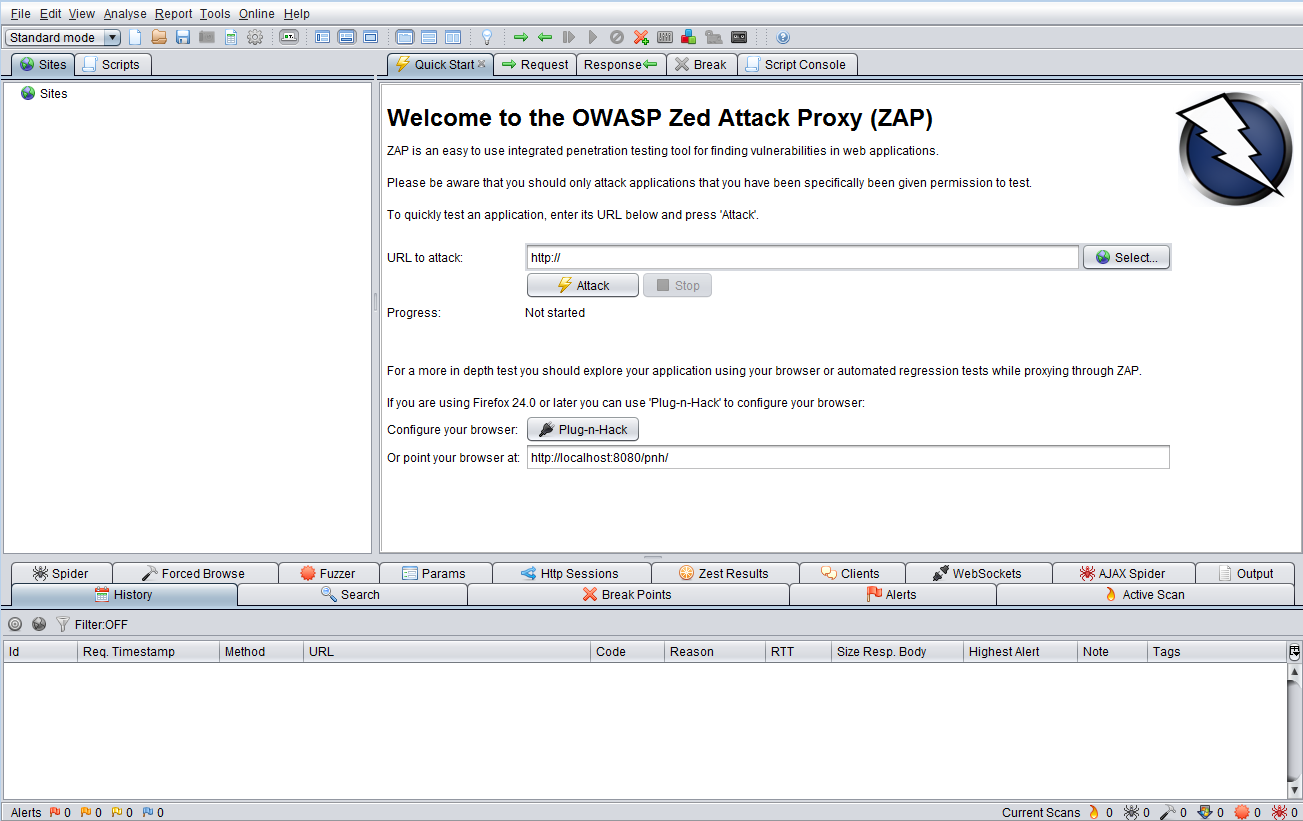
After completing the step above, you are done with the installation process and are ready to kick off a scan. Here is how the home page should look like.

pentesting_tool

The first thing I would like to call your attention to before setting up a scan is to please make sure you have explicit permission before you scan any site. It is best to deploy a dummy web application on your local machine and use that to scan and learn.

If you have questions about where to start in ZAP, the perfect place to start would be the awesome user guide that comes with the installation. It can be accessed from Help > OWASP ZAP User Guide:

free vulnerability scanner

I believe everything that is found on ZAP’s online wiki can be located in this user guide, if not more. I think that is great because as you look through the home page and menu options, it can be a bit overwhelming. But you can find answers to what all of the buttons do from the user guide as well as from here and here.

Going back to the homepage, you will see the following option:

best web vulnerability scanner

This is probably the best place to start off with your first scan. Alternatively, you could visit your demo site using the browser on which you configured ZAP proxy, and as you navigate through the site, ZAP will begin to populate the structure on the left home-page panel:

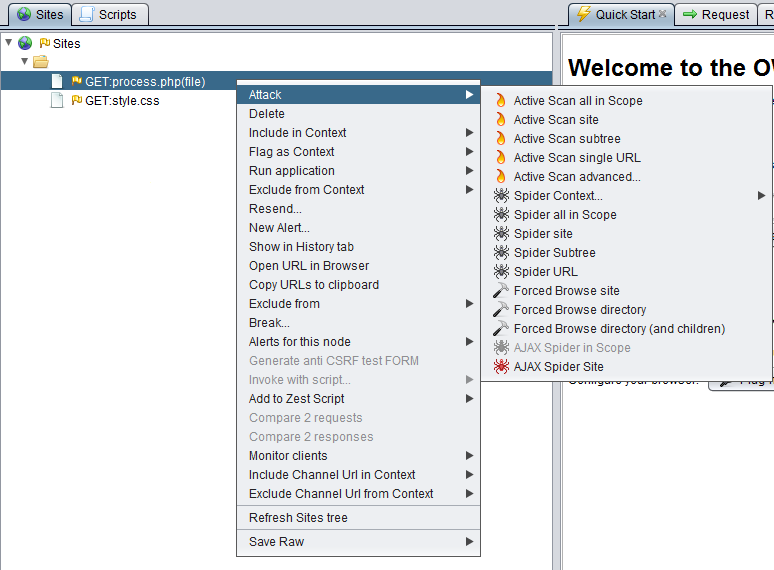
SitesAfter you have the site structure similar to the above, you can take your test in several different directions โ€” most of which can be viewed by simply right-clicking on any of the site’s pages:

website vulnerability scanner kali

If you are fairly new to web application security (like I am) chances are that whichever direction you choose to take, you will have questions. Fortunately, there are YouTube videos that you can refer to here. One video in particular that you should check out is this as it can come in handy when you want ZAP to auto-authenticate to your siteโ€™s login fields.

This concludes the introduction of a feature-packed tool from a long list of tools that I plan to explore. This already looks to be the best of the bunch. Even if you just heard of web application security, and you are looking to try one, this is a must-have for you; and it’s free! I am really glad that I got the chance to play with this tool and now it is part of my toolkit. ย I recommend that you check it out to begin rockinโ€™ on your Web Application Security game!

Follow me on Twitter: @azeemnowย 

Tagged , , , , , ,

How Free Web Filtering Software Can Protect You System?

Update

On August 1, 2016, Blue Coat, Inc. (K9โ€™s parent company) was acquired by Symantecโ„ข. As can be imagined Blue Coat and Symantec had a handful of similar products and unfortunately, it didnโ€™t make sense to maintain two competing products. it was decided to โ€œend-of-lifeโ€ K9 Web Protection.
Effective immediately, K9 Web Protection is no longer available for purchase or download. Technical Support for K9 will end on June 30, 2019.

It is unfortunate to see K9 Web Protection go. I am not aware of an alternative free software that provides the same level of protection at a premium quality. However, for those interested in alternatives to K9 Web Protection, I would recommend you can start with Quad9 and OpenDNS Home. While neither of them provides everything that K9 did, but they still protect your system against most common online threats.


โ€œWe may think one layer of security will protect us โ€“ for example, antivirus. Unfortunately for that approach, history has proven that, although single-focus solutions are useful in stopping specific attacks, the capabilities of advanced malware are so broad that such protections inevitably fail.โ€ โ€“ Jerry Shenk, Layered Security: Why It Works.

Making use of layered security for personal use is of the utmost importance as I have covered a couple of times in the past: here, here, andย here. Just as I have done in the past, I will use this post to share another tool that you can explore to support your personal layered security strategy.

My never-ending curiosity to explore and test new technologies can sometimes lead me to stumble upon genuinely impressive solutions. Fortunately for you, I believe this tool falls into that category.

K9 Web Protection is the software that I have been testing for some months now, and I must say, Iโ€™ve been truly pleased with its results. The software falls under the Web Filter category, which places a restriction on websites that you can visit. Web Filtering is used in two major cases. The first is to permit parents to control the sort of content accessible to their children, offering their kids a safe environment to learn and explore online. The second is for businesses who wish to prevent their employees from accessing websites that do not pertain to their jobs.

However, in addition to the above-mentioned, from my experience using this software on a daily basis, I have come across other benefits:

  • Real-time malware protectionโ€œhelps identify and block illegal or undesirable content in real time, including malware-infected sites. You also benefit from the WebPulse cloud service, a growing community of more than 62 million users who provide more than six billion real-time Web content ratings per day.โ€
    • You can learn more about web filtering and intelligence here.
  • Automatic content ratingsโ€œNew websites and web pages are created every minute, and no one person can possibly rate or categorize all of them. To ensure protection against new or previously unrated websites, Blue Coatโ€™s patent-pending Dynamic Real-Time Ratingโ„ข (DRTR) technology automatically determines the category of an unrated web page, and allows or blocks it according to your specifications.โ€

Another advantage of the K9 Web Protection is that it is backed by Blue Coat (acquired by Symantec in 2016), ย the leader in Web Security โ€œwith an impressive portfolio of integrated technologies serving as a trusted platform to deliver Cloud Generation Security to more than 15,000 customers worldwide.โ€

This solution is truly an โ€œenterprise-class security software designed for home computers.โ€ Also, did I mention that itโ€™s free! โ€œAs part of the Blue Coat Community Outreach Program, K9 Web Protection is free for home use. You can also purchase a license to use K9 Web Protection for business, government, non-profit, or other use.โ€

I will do a quick overview of the installation and usage of the software, but you can find a well-documented quick start guide and user manual here:

Installation and Usage Overview:

installk9

  • The installation process should take a couple of minutes to complete as it is self-explanatory.
  • Upon completion, the applicationโ€™s interface will open in your browser:

K9_Browser_admin_page

  • To view or modify any of the configurations, you will be prompted to enter the password you created during installation.
  • Here are some of the options and details you can access from the Setup page:

k9_block_categories.PNG

  • Web Categories to Block: choosing one of the available levels allows you to block selected categories of websites.
  • Time Restrictions: 3 options are available to block web access depending on the time of day. Unrestricted places no restrictions on web access. NightGuard blocks all web access during contiguous blocks of time every day. Custom enables you to choose days of the week and time periods to block all web access.
  • Web Site Exceptions: Allows you to create lists of websites to โ€œalways blockโ€ or โ€œalways allow.โ€ Blocking Effects: โ€œBark When Blockedโ€ plays a barking sound when a web page is blocked. Make sure the sound is enabled and not muted. Show Admin Options displays options on blocked web pages which enable administrators to view the blocked web page. Enable Time Out allows you to block all web access if too many web pages are blocked in a given period of time
  • URL Keywords: Allows you to enter keywords which, if found in a URL, cause a โ€œblock pageโ€ to display. Safe Search: โ€œRedirect to K9 Safe Searchโ€ will redirect searches to various search engines through K9’s Safe Search. This provides a safer search experience than other search engines provide. Force Safe Search will prevent users from disabling Safe Search functionality provided by various websites.
  • Other Settings: โ€œUpdate to Betaโ€ enables you to get advance copies of new K9 Web Protection software undergoing development. Blue Coat distributes Beta versions so that K9 gets used in “real world” environments before being released as a final version. Please note that Beta versions might be incomplete and less stable than final versions. โ€œFilter Secure Trafficโ€ enables K9 to block secure websites (i.e. sites that use the HTTPS protocol).
  • Password/Email: Allows you to change your K9 administrator password or e-mail address.
  • K9 Update: Installs software updates if available.
  • View Activity Summary: This tab shows a summary of all โ€œWeb Activityโ€ on your computer: To view more details, click the โ€œCategoryโ€ or โ€œRequestsโ€ links. On these pages, you have the option of grouping the data by month or by day. To view Administrative Events details, click the โ€œView Allโ€ link. (Some of these activities are as a result of automatic browser and toolbar updates, for example, and might display URL formats with which you are not familiar.) By selecting “Clear Logs”, all your activity data will be cleared; however, three daysโ€™ worth of administrative events will be retained.k9_activity_summary

As you can see from the above, the information provided here is extremely granular and it allows you to not only get an easy view of your browsing behavior but also the behaviors of the various system and application components. I have been using this solution in conjunction with other traditional protective mechanisms, such as anti-virus, and the benefits have been massive.

For instance, sometimes, while surfing the internet, I would see a certain URL get blocked or a visit history to a certain category in a website without a recollection of visiting that website. However, after investigations, I found that some components of a software installed on my computer or an extension in my browser is the reason behind that activity.

โ€œThe malware ecosystem has changed drastically in the past 10 years, to the point that the old precautions are just no longer enoughโ€ –ย Malwarebytes LABS.ย I have been using K9 Web Protection on many of my personal computers because I have been impressed with it, so I thought to share it here. I believe it provides that extra layer of protection that we can all appreciate in a world where cyber threats are on the rise. In addition, I believe this solution is a wonderful option for those that are less familiar with common cyber threat vectors (i.e. parents) and can easily fall for phishing emails or click on an adware as they browse the internet.

As we have known for some time, โ€œthere is no single solution for the information security problems we face today. A combination of many different kinds of security tools is required to protect you from modern threatsโ€ฆโ€ and I believe K9 Web Protection is among the best tools we have today, so you should definitely equip yourself with it if you are going to create a safe web environment for yourself, your kids, your employees, and everyone around you!


ย 


Tagged , , , , , , , , ,
Advertisements